

Site safety assessments, on site and remote.
SARI’s certified occupational health and safety experts assess your offices, warehouses, clinics and compounds in person, or remotely from photos, video or a live call. You get one clear brief: findings, signage and priority actions.
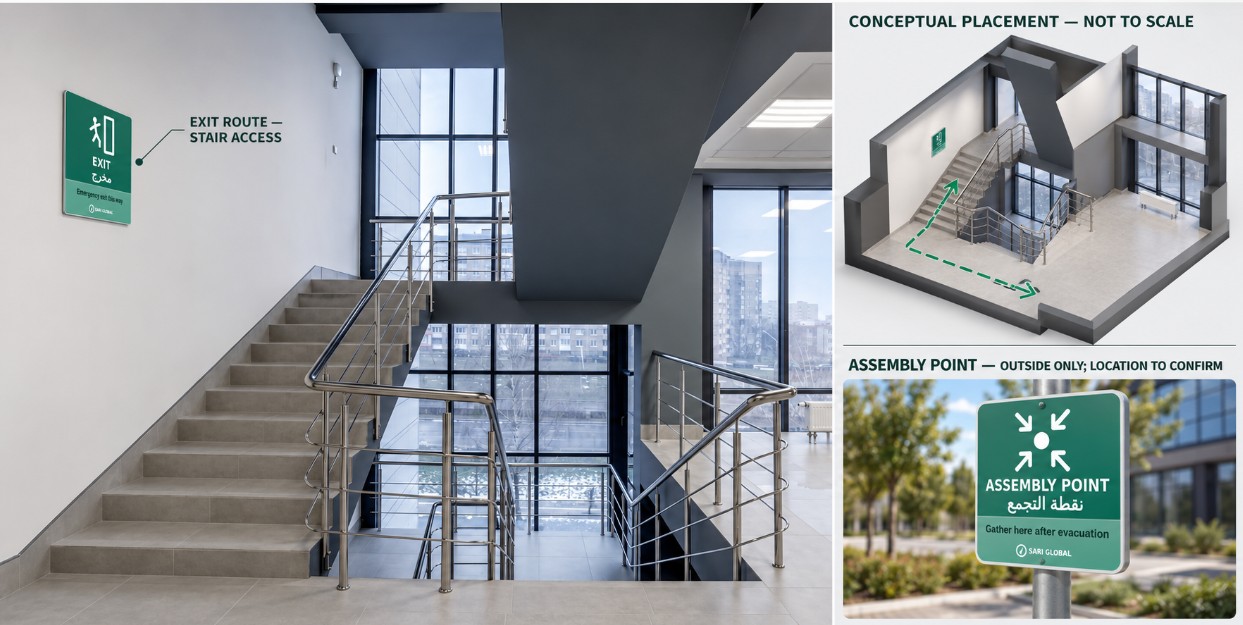
On site or remote, to the same standard.
In-person assessment
An expert visits the site and measures, tests and walks the routes that imagery cannot confirm, then issues the same brief with findings graded on site.
- Distances, door swing and sight lines measured
- Fire and life safety equipment checked, including service dates
- Entrances, locks, perimeter and approach reviewed
- Safe room construction and supplies inspected
- Recommended for sites with more than 20 staff or a safe room
Remote assessment
You send photos or a short video of each area, or share your screen on a live video call. The expert reviews the evidence, marks where each sign belongs and returns a brief.
- Photos, short video or live screen share
- Annotated evidence with signs placed on your own images
- Signage check for each area and a schedule you can order from
- A clear list of what a remote review cannot confirm
Certified experts. A full sign suite.
Eight of the 31 signs in the SARI suite, in the bilingual edition, simplified for this page.
Assess the sites behind your subscription.
SARI Perimeter
Assess the sites you already monitor, so a site’s live risk level sits next to how well it is signed and prepared.
See SARI Perimeter →STRAT-i subscriptions
Add a site assessment for the offices and facilities behind your country subscription.
See STRAT-i →Security training
Follow the assessment with first aid, fire and evacuation drills for the teams who work at the site.
See training →On its own
One office or a network of sites, assessed remotely or on site, with no subscription needed.
Request an assessment →From first call to brief.
Scope
On a short call we agree the sites, the areas to assess and whether to go remote or on site.
Capture
You send photos or a short video, or share your screen, using the SARI capture guide below.
Expert review
A certified SARI occupational health and safety expert reviews every frame against the area it shows.
Brief and follow-up
You receive annotated evidence, findings, a signage schedule and priority actions, then reassess when the site changes.
See how a remote assessment works
Add a photo or a short video of a room, entrance or stairwell. Place SARI signs where they belong, then generate a sample brief of what a remote assessment returns for that space. Nothing leaves your browser.
- Add evidencePhoto or video frame
- Place signsDrag to position
- Read the briefFindings and schedule
Tap a sign below to add it. Drag signs to move them, and use the size slider for the selected sign.
Sign library
A brief you can act on.
Annotated evidence
Your own photos or video frames, with each sign placed where it would be mounted.
Signage check
What each area needs, what is placed and what is missing, with a comment on each.
Signage schedule
A numbered list of every sign, its edition and its size, ready to order from.
Remote review limits
What the imagery confirms and what needs a measured check, a walkthrough or a visit.
Priority actions
The first steps to take, including when to move to an in-person assessment.
In a full assessment
A context page from STRAT-i, an indicative floor plan and an emergency plan outline.
How to record your site.
Use this as a checklist, or ask your assessor to walk you through it on a call.
Photos
- Each exit, from inside and from the approach
- Corridors and stairwells, looking along their length
- Fire extinguishers and call points, with the wall they are mounted on
- First aid points and assembly points
- Stores, server rooms and kitchens
- Entrance and reception
- The safe room, inside and at its door
Video
- Walk the route from the furthest room to the nearest exit
- Move slowly and pause on each door, sign and piece of equipment
- Say the name of each room as you enter it
- Film doors both open and closed
- A live screen share on a video call works the same way
For every area
- Landscape orientation and good light
- Nothing blocking the view of walls, doors and ceilings
- Wide enough to show where a sign would be mounted
- Several files are fine, there is no limit worth worrying about
Any site where people need to know where to go.
Before you start
What do I need to send for a remote assessment?
Photos or a short video of each area you want reviewed: entrances, exits, corridors, stairwells, stores and any safe room. Several files are fine. You can also share your screen on a live video call and the assessor captures frames as you walk the site.
What can a remote review confirm, and what can it not?
It shows where exits, equipment and signs are, and where signs are missing. It cannot verify distances, door swing, equipment service dates, locks or wall construction. Those need a measured check, a walkthrough video or a visit, and the brief says which.
When should we choose an in-person assessment?
We recommend one for sites with more than 20 staff or a safe room, and wherever a remote review flags items it cannot confirm.
Does the demo upload my photos?
No. The demo runs in your browser and nothing leaves your device. For a real assessment you send evidence to SARI by the route we agree with you.
Can we add this to a SARI subscription or to Perimeter?
Yes. Many clients will want the offices and facilities behind a subscription assessed as well. Tell us which sites and we will scope it with your account.
Assess your sites with SARI.
Tell us about your sites and whether you prefer an on-site or a remote assessment. A SARI expert will reply to agree the scope.
- On site or remote, by certified and experienced occupational health and safety experts
- Signs in English, Arabic or bilingual editions
- Available on its own or with a subscription, Perimeter or training